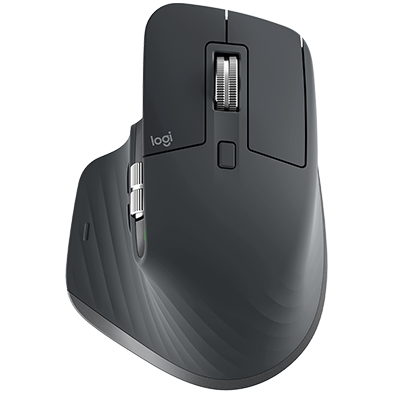
Compatibility | General Use Info
| Product Information | ||
|---|---|---|
| Component | Model Number (M/N) | Location |
| Mouse | M-R0077 | Under the product |
| Receiver | C-U0008 | Side of product |
| Product Dimensions | ||||
|---|---|---|---|---|
| Component | Height | Length | Depth | Weight |
| Mouse | 51 mm (2 inches) | 124.9 mm (4.92 inches) | 84.3 mm (3.32 inches) | 141 g (4.97 ounces) |
| General Product Specifications | |
|---|---|
| Wireless Protocol | Dual connectivity: - Logitech USB receiver, 2.4 GHz wireless technology. (10 m) - Bluetooth Low Energy technology |
| Software Support (at release) | Logitech Options (NOTE: Check website for the latest software release.) |
| OS/Platform Support (at release) |
Bluetooth: (*) Sensor, wheel, and buttons will be supported without adding additional drivers in most popular Linux distributions. |
| Power Type | Rechargeable |
| Mouse Specifications | |
|---|---|
| Connection Type | Logitech Unifying USB receiver and Bluetooth® Low Energy |
| Buttons | Left/Right-click, Back/Forward, App-Switch, Wheel mode-shift, Middle-click Scroll Wheel: Yes, with smart-shift Thumbwheel: Yes Gesture button: Yes |
| Indicator Lights (LED) | Low battery LED |
| Battery Details | Rechargeable Li-Po (500 mAh) battery, not replaceable |
| Battery Life (rechargeable) | Up to 70 days |
| Battery Charge Speed | Empty to full charge: 2 hours 1 min charge = 3 hours of use 3 min charge = 1 day of use |
| Other Features | Fast-charging (1 minute ~ 2 hours of usage) |
| DPI (Min/Max) | Resolution: 200 – 4,000 DPI |
| Sensor | Darkfield high precision |
FREQUENTLY ASKED QUESTIONS
COMPATIBILITY
GENERAL USE INFO
- What does the hidden button on my mouse do in iPadOS?
- Does the thumbwheel work on iPadOS?
- Does MagSpeed scrolling on MX Master 3 work on iPadOS?
- Change the scrolling direction of mouse on iPadOS
- Warning message when Logitech device is connected to iPadOS
- What happens when you right-click in iPadOS?
- Cleaning Logitech keyboards and mice
- Connectivity range of the Unifying receiver
- Copy and paste an image from a presentation on one computer to a presentation on another
- Use Logitech Flow to copy an application on one device to the same application on another device
- How does Horizontal Scroll work?
คำถามที่พบบ่อย
There are no Downloads for this Product
There are no Downloads for this Version.
Compatible Product
